BANA7046 Module 5

1. Model Evaluation

1.1. Training Set and Test Set Split

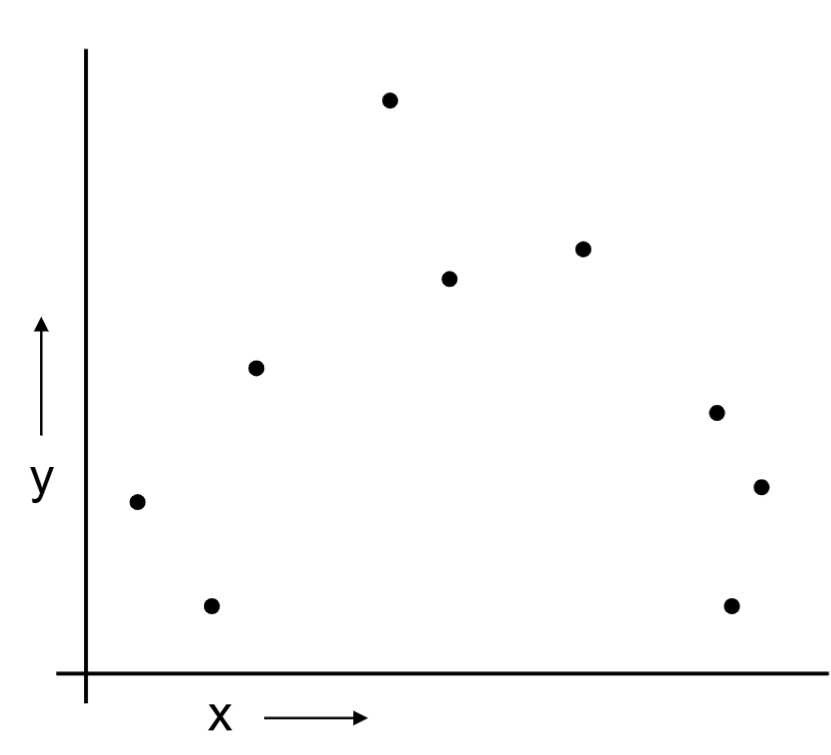
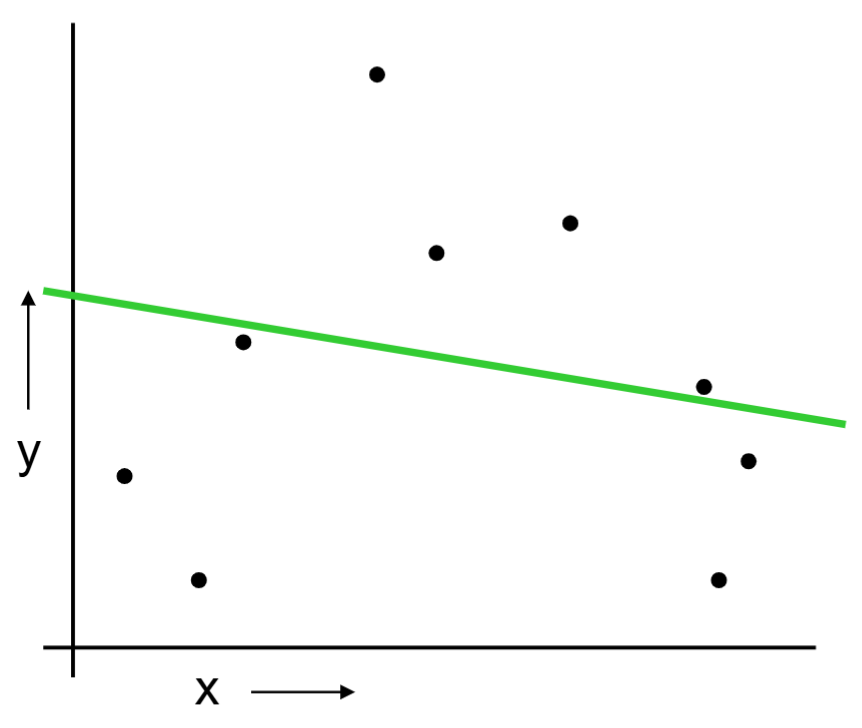
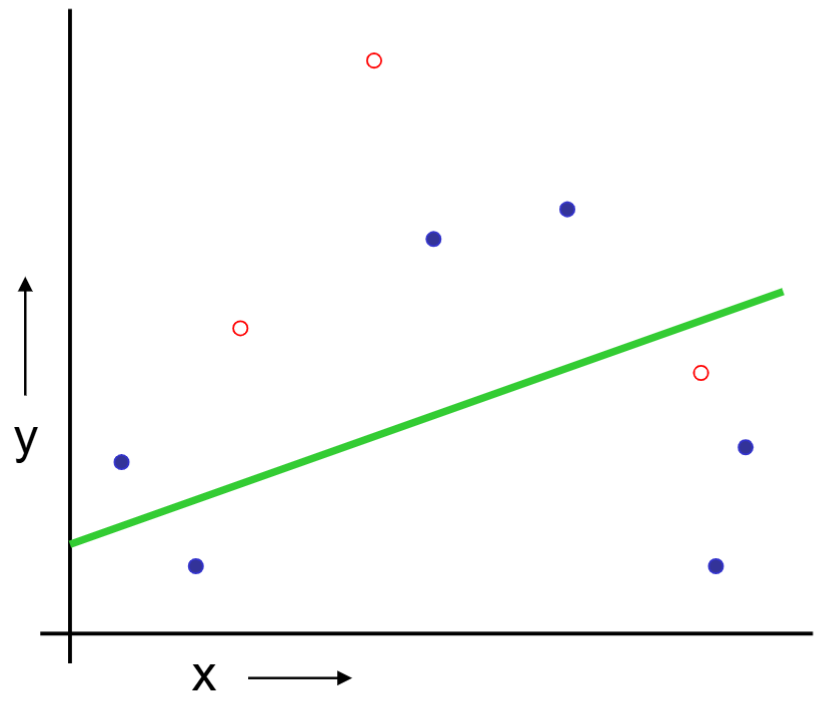
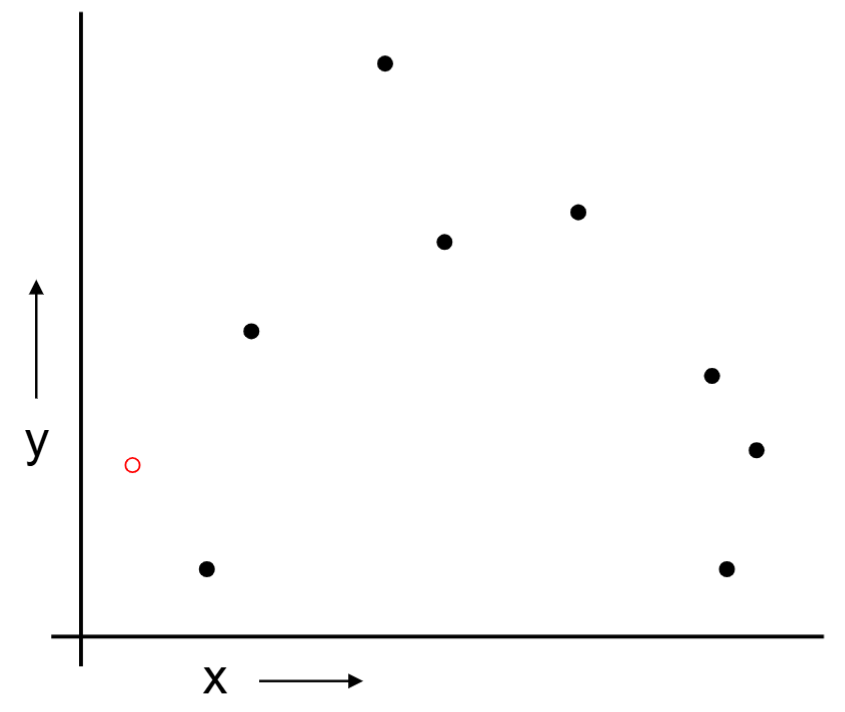
Suppose the data is as follows.

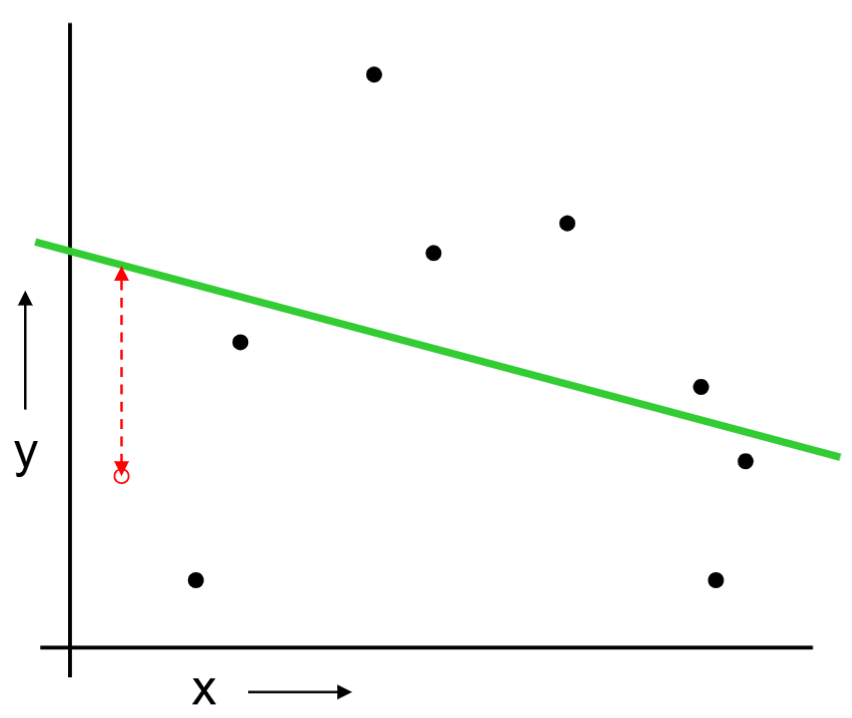
Is a linear regression model a good choice?

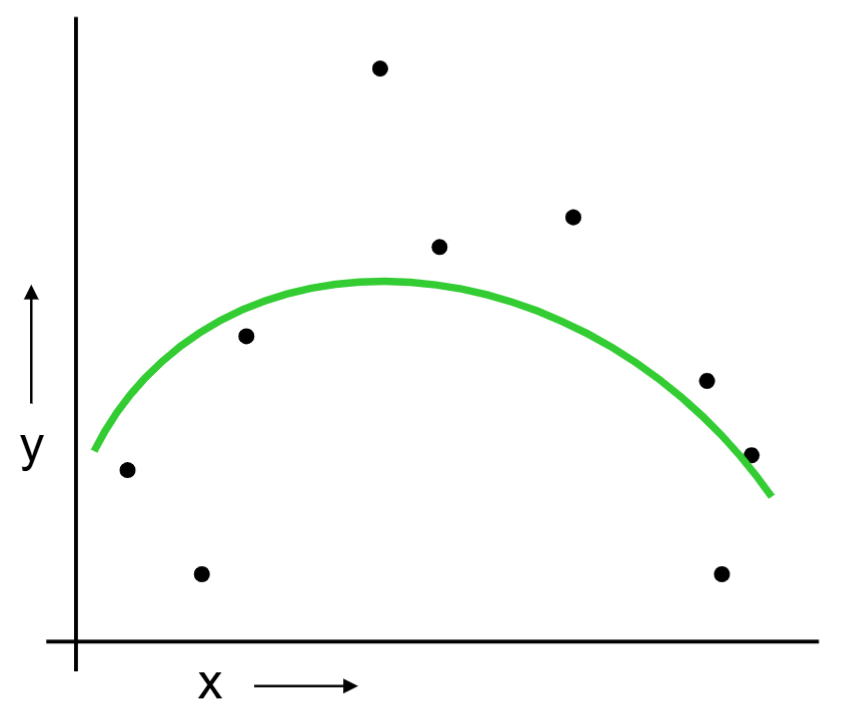
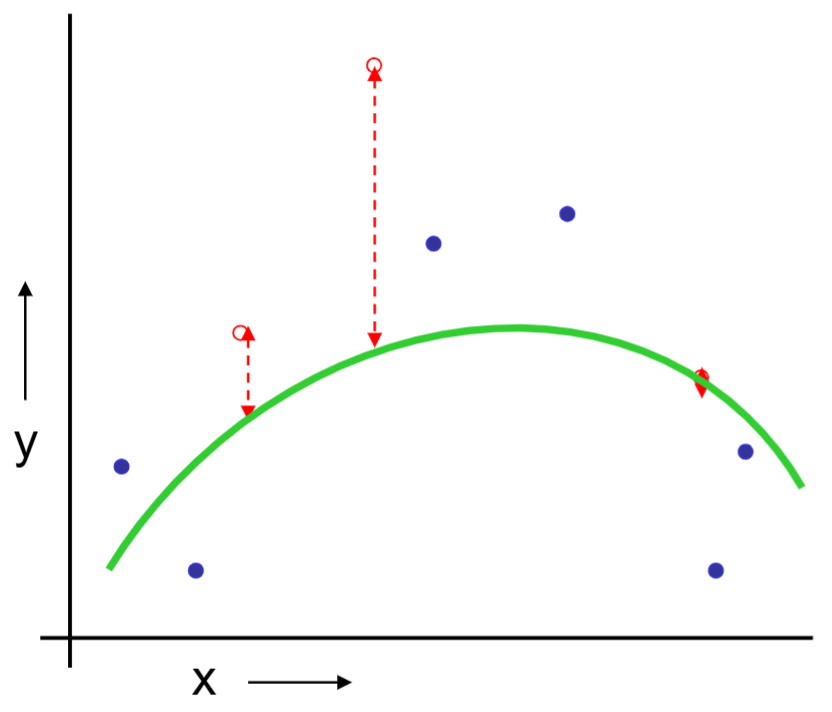
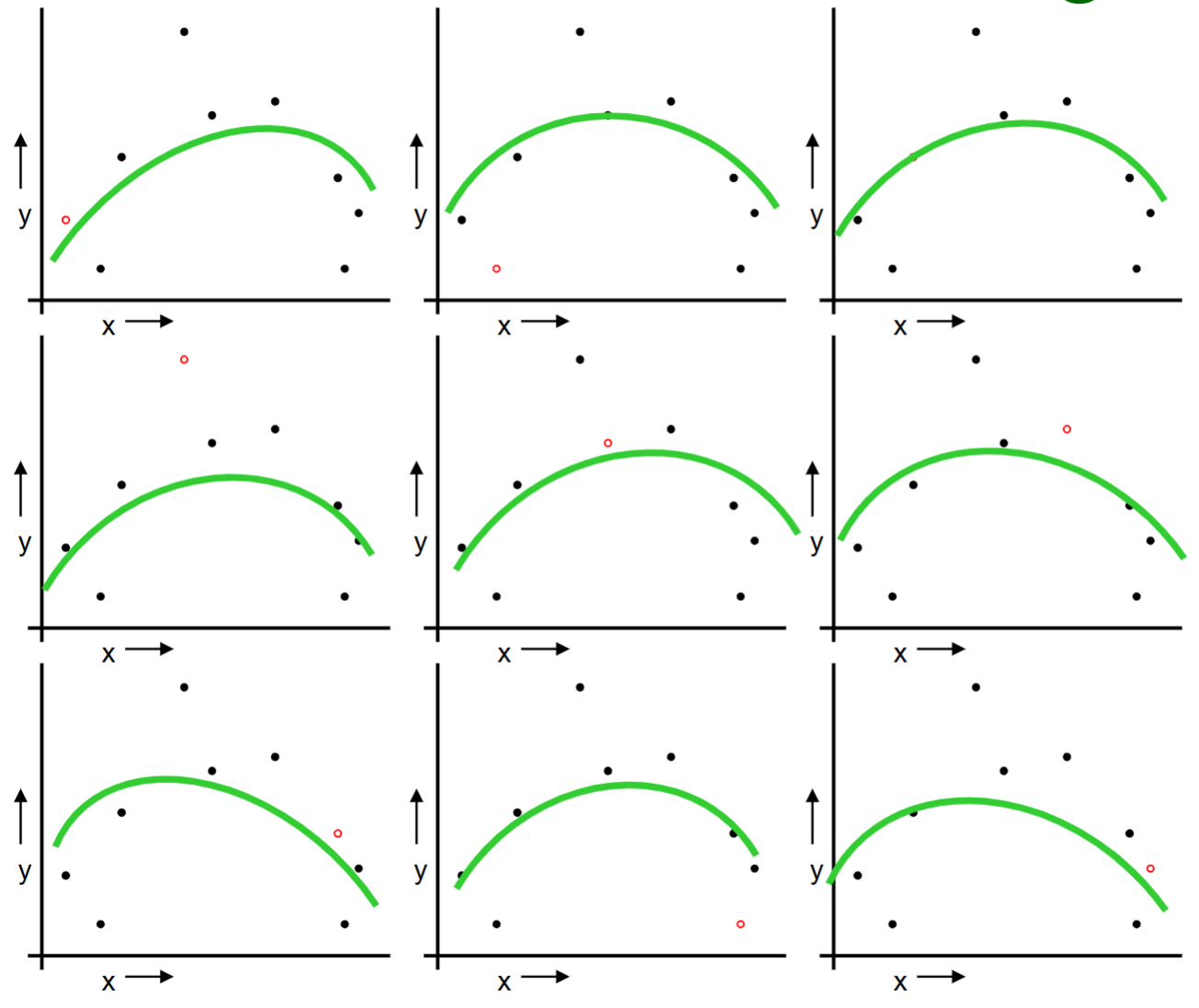
Is a quadractice regression a good choice?

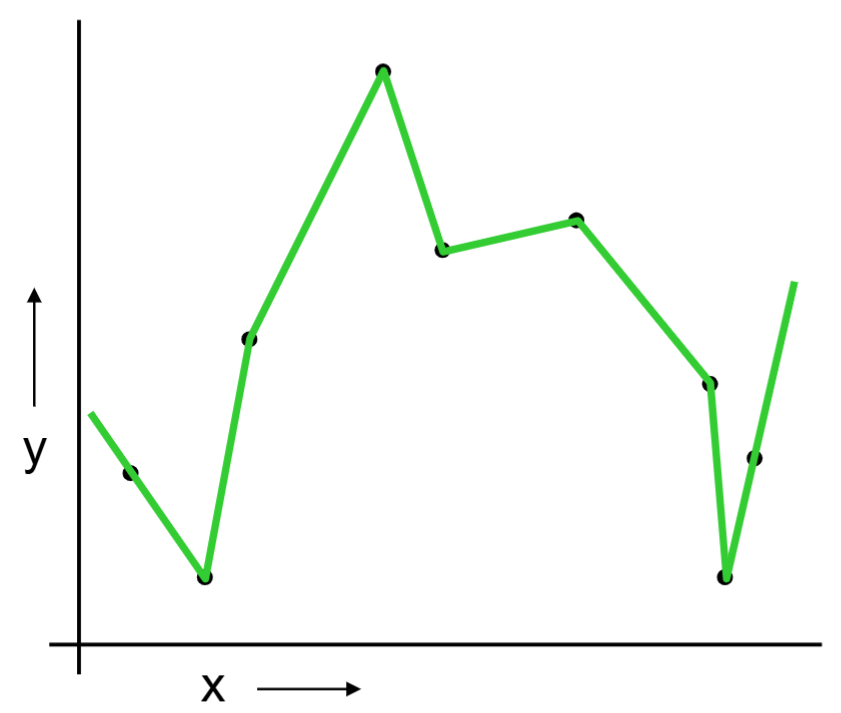
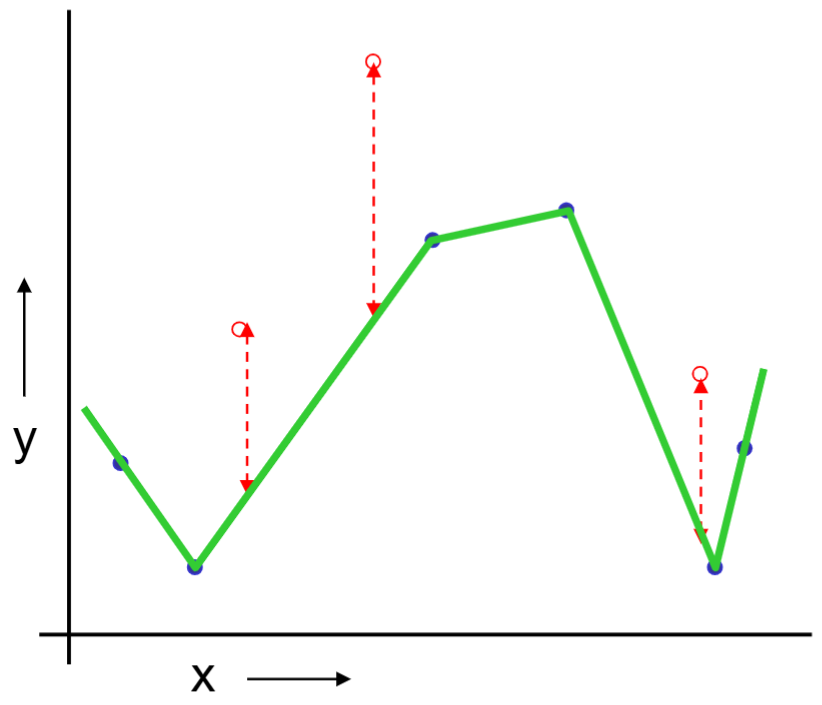
Or should we “join the dots” also know as piecewise linear nonparametric regression?

One approach to ask “How well is the model going to predict future data drawn from the same distribution?”

We can split the data into training and test sets. Build the model on the training set, evaluate the model on the test set.

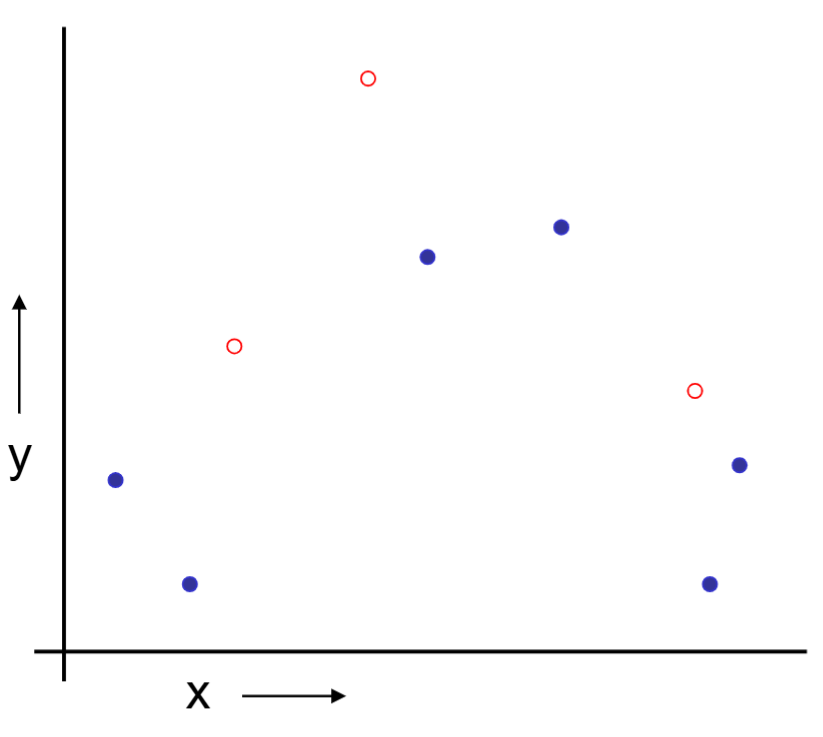
For example, we can randomly choose 30% of the data to be in the test set and the remainder is the training set, we fit regression on the training set and estimate the model’s future performance on the test set.

Below is an example of training and test set split.

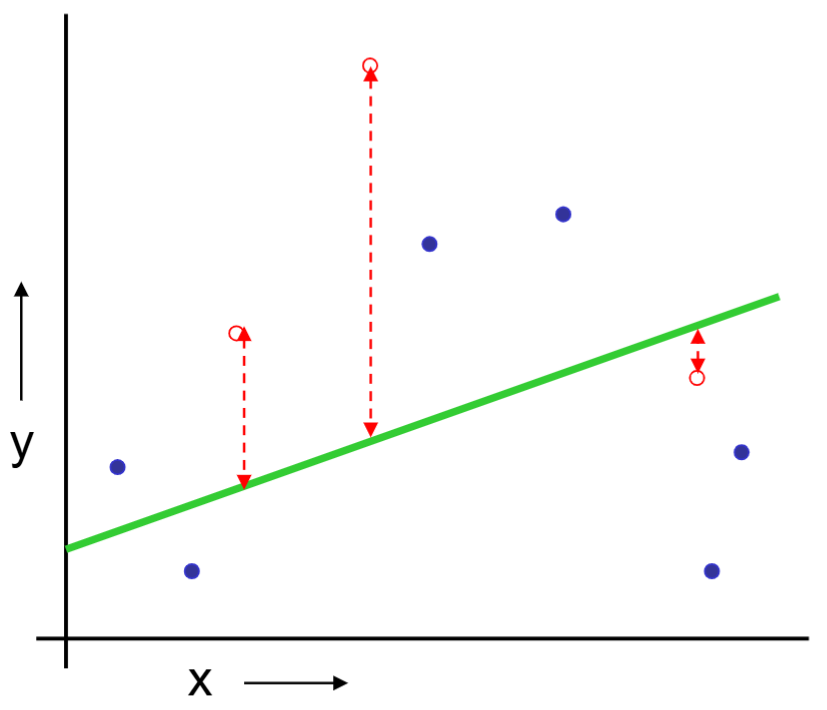
We build a linear regression on the training set.

Can predict on the test set and collect the prediction errors.

The same procedue can be done on the quadratic regression and “join the dots.”

For this training and test set split method,

The good news: very simple, just choose the model with the best test set performance.

Bad news: waste data. If we don’t have much data, our test set may be lucky or unlucky. In other words, the test set estimation of the performance is unstable.

1.2. Leave One Out Cross Validation (LOOCV)

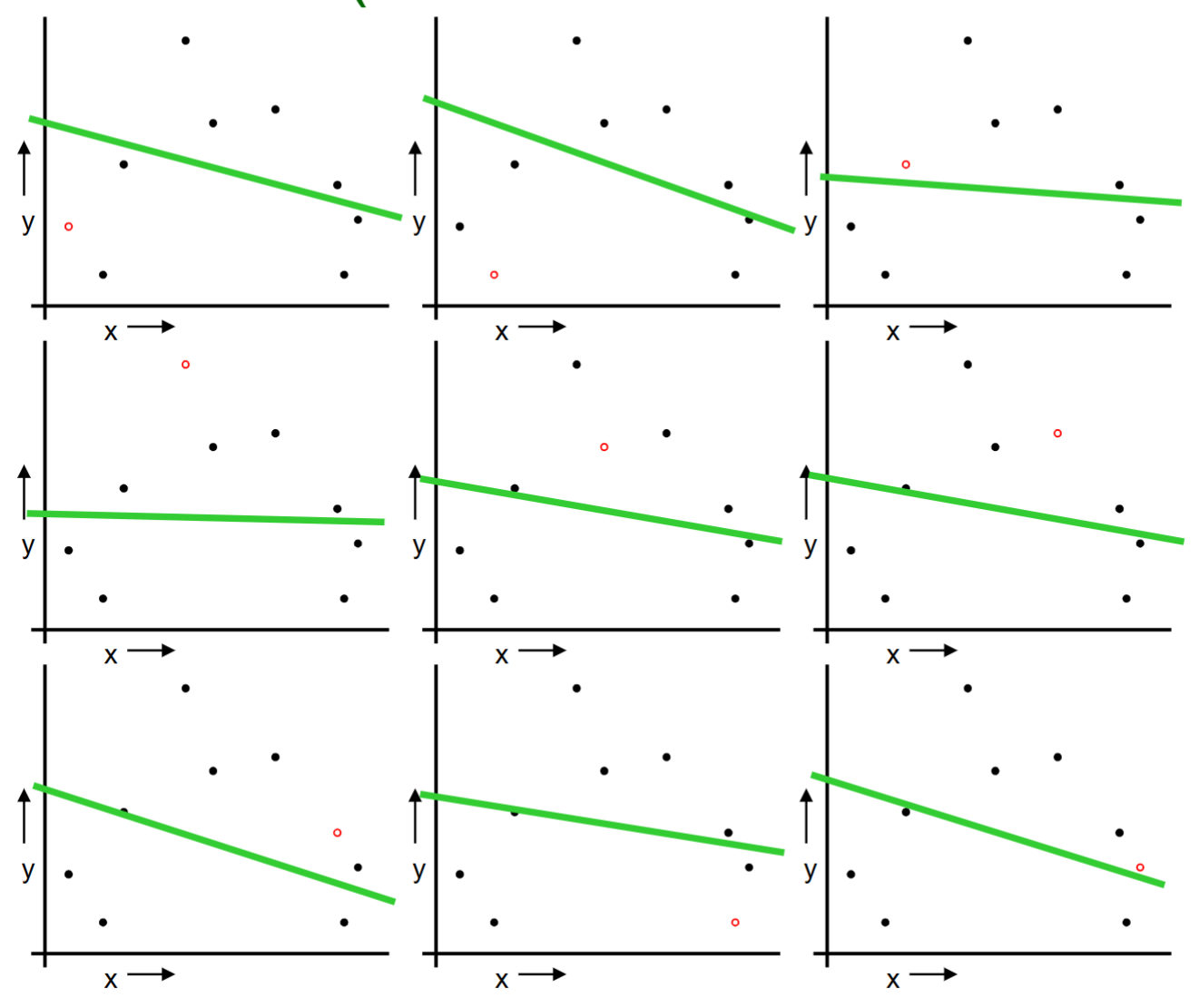
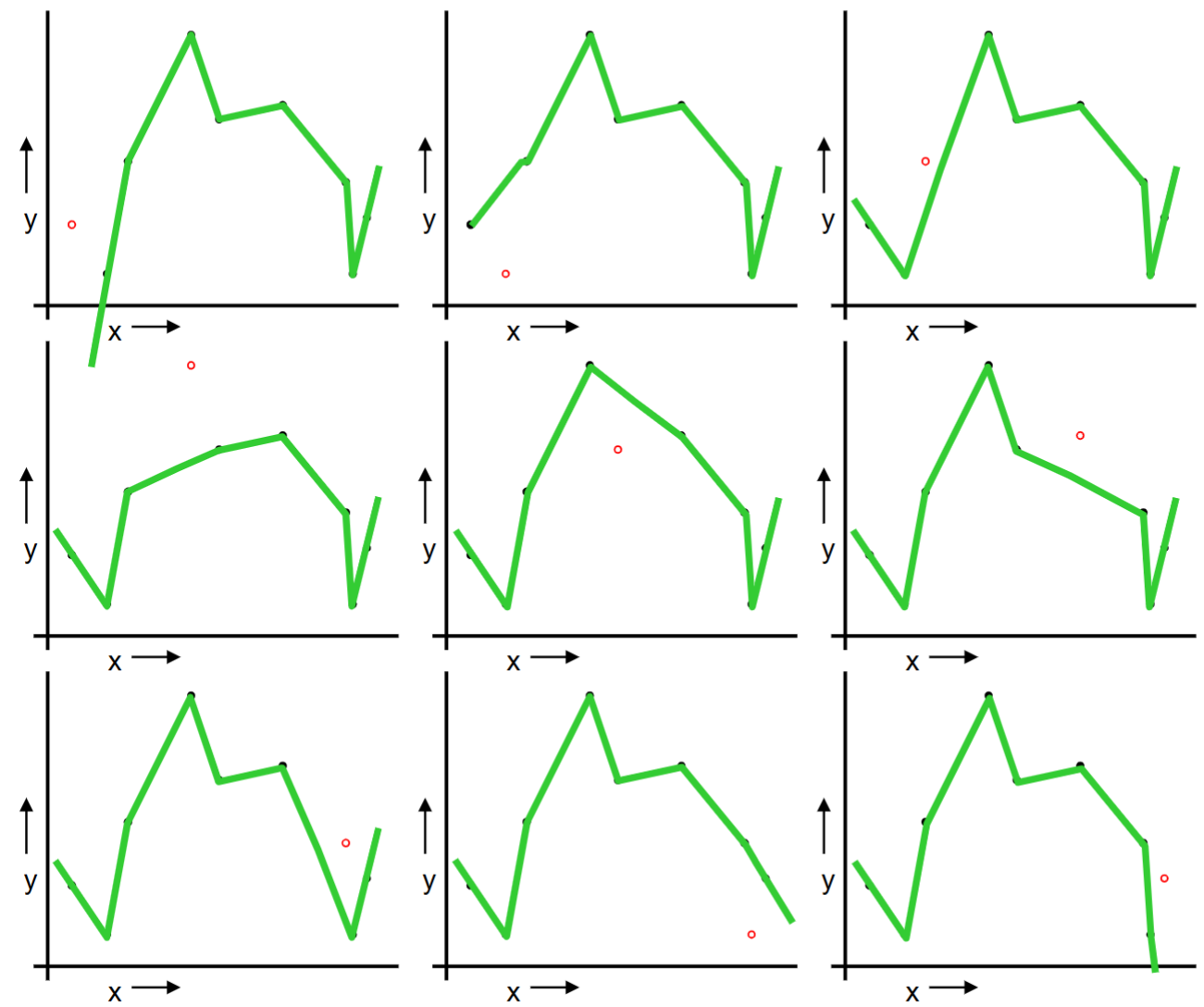
For i = 1 to n, do the following:

Temporarily remove the i-th observation (x_i, y_i) from the data.

Train the model on the remaining n-1 observations and evaluate the model on the i-th observation.

Repeat the above procedure for n times for each observation.

We can collect all the prediction errors and report the mean error.

We repeat the same procedure for quadratic regression and “join the dots.”

Let’s compare training/test split and leave one out cross validation.

Col1 Downside Upside
Train/test split variance: unreliable estimate of future performance Cheap and simple
Leave one out CV Expensive. May have some weird behavior. Don’t waste data

Can we get the best of the both methods?

1.3. k-Fold Cross Validation

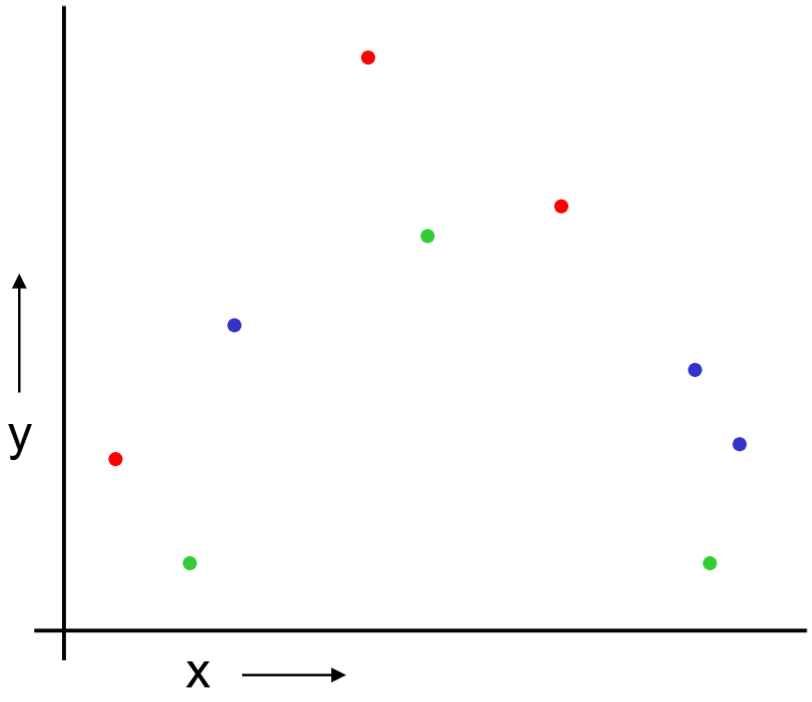
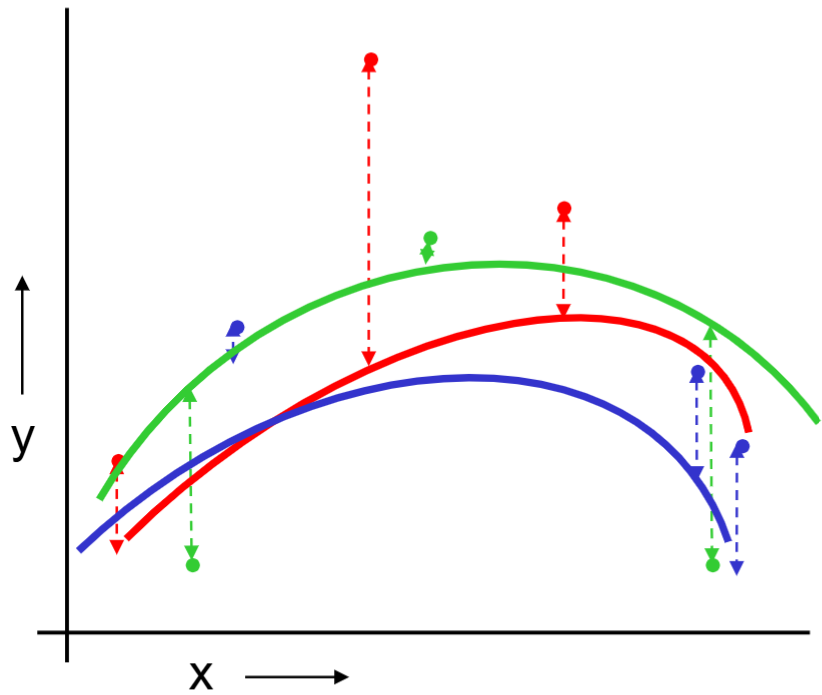
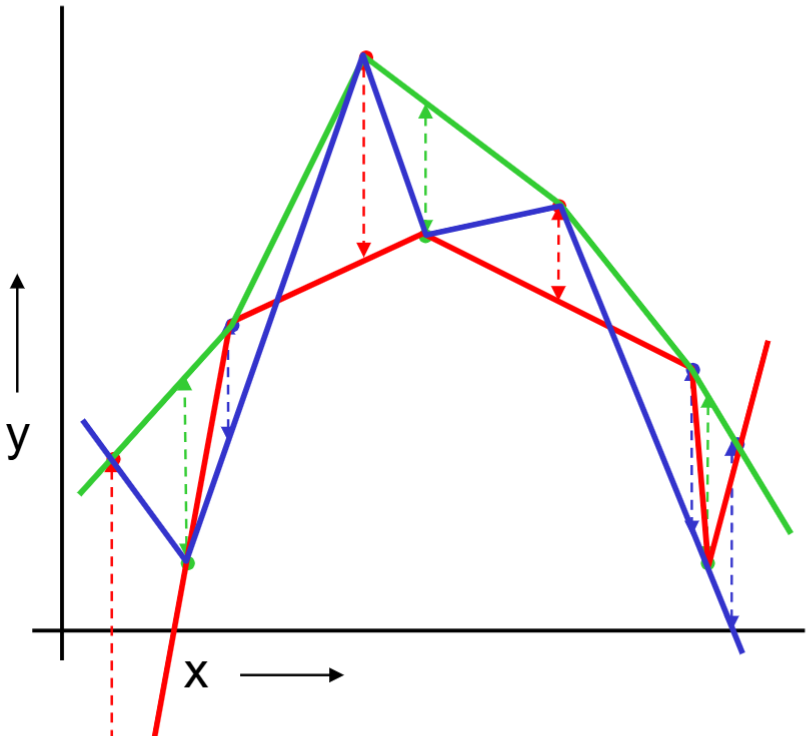
Randomly break the dataset into k partitions.

In the following example, we have k=3 partitions colored as red, green and blue.

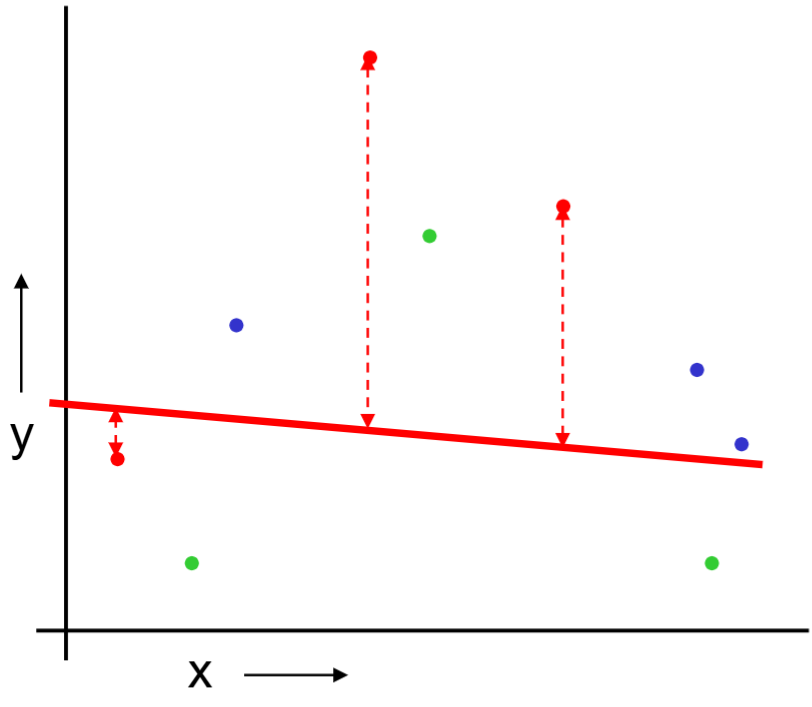
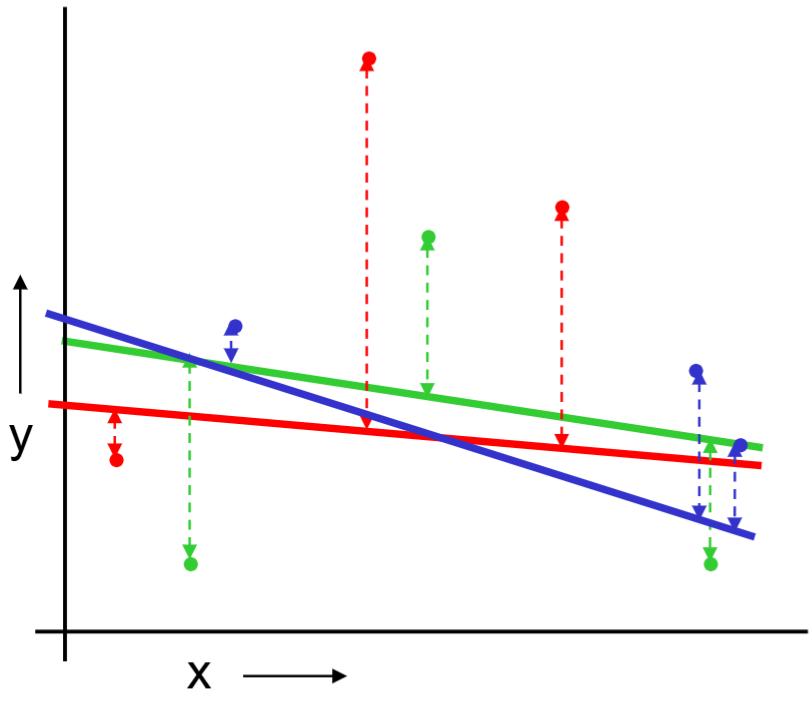
For the red partition: Train on all the points not in the red partition. Find the test-set sum of errors on the red points.

We repeat the same procedure for green and blue partitions.

We then report the mean prediction error.

Evaluation Method Downside Upside
Train/test split variance: unreliable estimate of future performance Cheap and simple
Leave one out CV Expensive. May have some weird behavior. Don’t waste data
10-fold CV Wastes 10% of the data. 10x more expensive than test set Only wastes 10%
3-fold CV More wasted data Slightly better than test set.

CV is used for model selection/comparison/evaluation and tuning parameter selection.

2. Evaluation of Linear Models and LASSO

2.1. Linear Models

We now use cross validation, cv.glm(), to evaluate different linear models on the Boston housing price data set. We compare the full model with the model with only two covariates, indus and rm.

library(MASS) 
data(Boston) 
library(boot) 
model_full = glm(medv ~ ., data = Boston) 
model_2var <- glm(medv ~ indus + rm,
                  data = Boston) 
# 10 fold CV
cv.glm(data = Boston,
       glmfit = model_full,
       K = 10)$delta[2] 
[1] 23.90952
cv.glm(data = Boston,
       glmfit = model_2var,
       K = 10)$delta[2]
[1] 40.17651

The reported numbers by default are mean squared error (MSE). In its output, $delta[2] represents the bias corrected cross validation score. We can certainly change to other measure such as mean absolute deviation (MAE).

MAE_cost <- function(y, yhat){ 
  return(mean(abs(y - yhat)))
} 
cv.glm(data = Boston, 
       glmfit = model_full, 
       cost = MAE_cost, 
       K = 10)$delta[2] 
[1] 3.381935
cv.glm(data = Boston,         
       glmfit = model_2var,
       cost = MAE_cost,
       K = 10)$delta[2]
[1] 4.265052
MSE_cost <- function(y, yhat){ 
  return(mean((y - yhat)^2))
} 
cv.glm(data = Boston, 
       glmfit = model_full, 
       cost = MSE_cost, 
       K = 10)$delta[2] 
[1] 23.67792
cv.glm(data = Boston,         
       glmfit = model_2var,
       cost = MSE_cost,
       K = 10)$delta[2]
[1] 39.87104

If we set K to be the sample size, it is essentially LOOCV.

cv.glm(data = Boston,
       glmfit = model_full,
       K = nrow(Boston))$delta[2] 
[1] 23.72388
cv.glm(data = Boston,
       glmfit = model_2var,
       K = nrow(Boston))$delta[2]
[1] 39.94028

2.2. LASSO

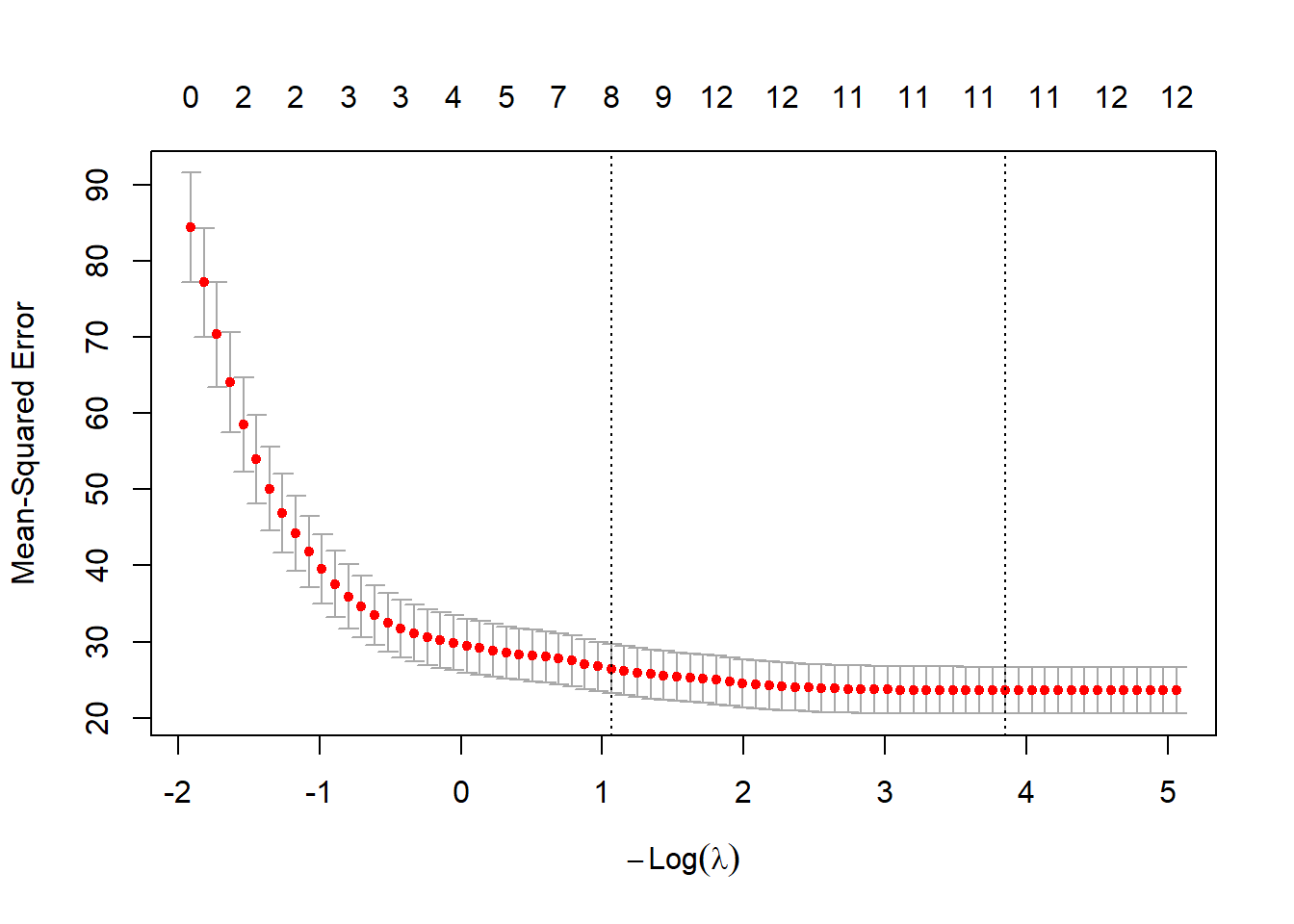
One of the most important applications of cross validation is to select the tuning parameters. For example, in LASSO, we need to select the tuning parameter \(\lambda\) which adjusts the amount of penalty on the coefficient estimate.

#install.packages("glmnet") 
library(glmnet) 
Loading required package: Matrix
Loaded glmnet 4.1-10
lasso_fit  <- glmnet(x = as.matrix(Boston[, names(Boston)!='medv']),
                     y = Boston$medv,
                     alpha = 1) 
#use 10-fold cross validation to pick lambda 
cv_lasso_fit = cv.glmnet(x = as.matrix(Boston[, names(Boston)!='medv']),
                         y = Boston$medv,
                         alpha = 1,
                         nfolds = 10) 
plot(cv_lasso_fit) 

cv_lasso_fit$lambda.min 
[1] 0.02118502
coef(lasso_fit, s = cv_lasso_fit$lambda.min) 
14 x 1 sparse Matrix of class "dgCMatrix"
             s=0.02118502
(Intercept)  34.880894915
crim         -0.100714832
zn            0.042486737
indus         .          
chas          2.693903097
nox         -16.562664331
rm            3.851646315
age           .          
dis          -1.419168850
rad           0.263725830
tax          -0.010286456
ptratio      -0.933927773
black         0.009089735
lstat        -0.522521473
pred_IS <- predict(lasso_fit,
                   as.matrix(Boston[, names(Boston)!='medv']),
                   s = cv_lasso_fit$lambda.min)
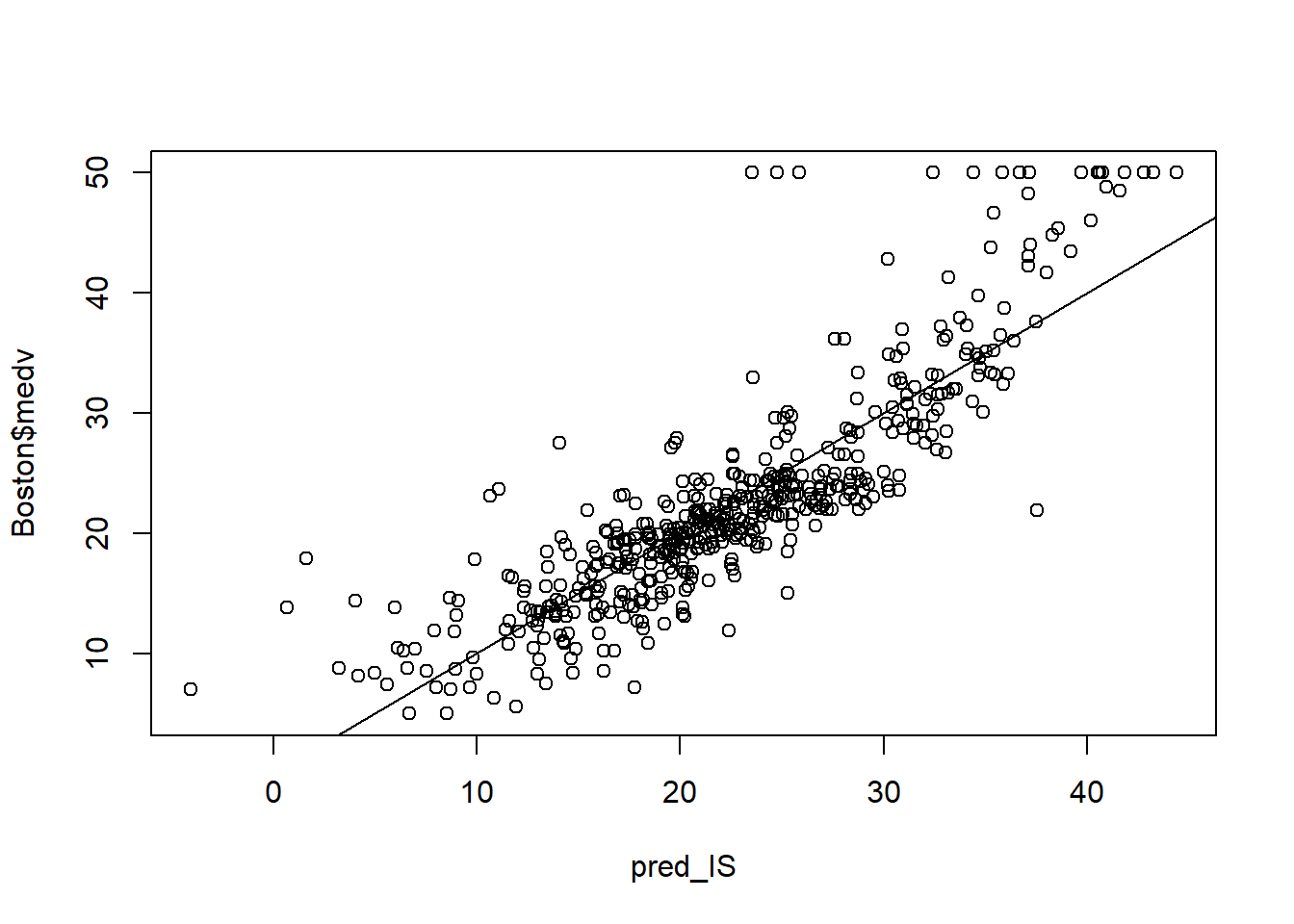
plot(pred_IS, Boston$medv)
abline(a = 0, b = 1)

MSE_cost(pred_IS, Boston$medv)
[1] 21.92126
MAE_cost(pred_IS, Boston$medv)
[1] 3.259372

3. Evaluation of Logistic Regression

3.1. Evaluation Criterion

In the previous section, we focus on linear models where the response variable is numeric. To evaluate the linear models, we compare the predicted response with the actual response and obtain the prediction error, for example, MSE or MAE.

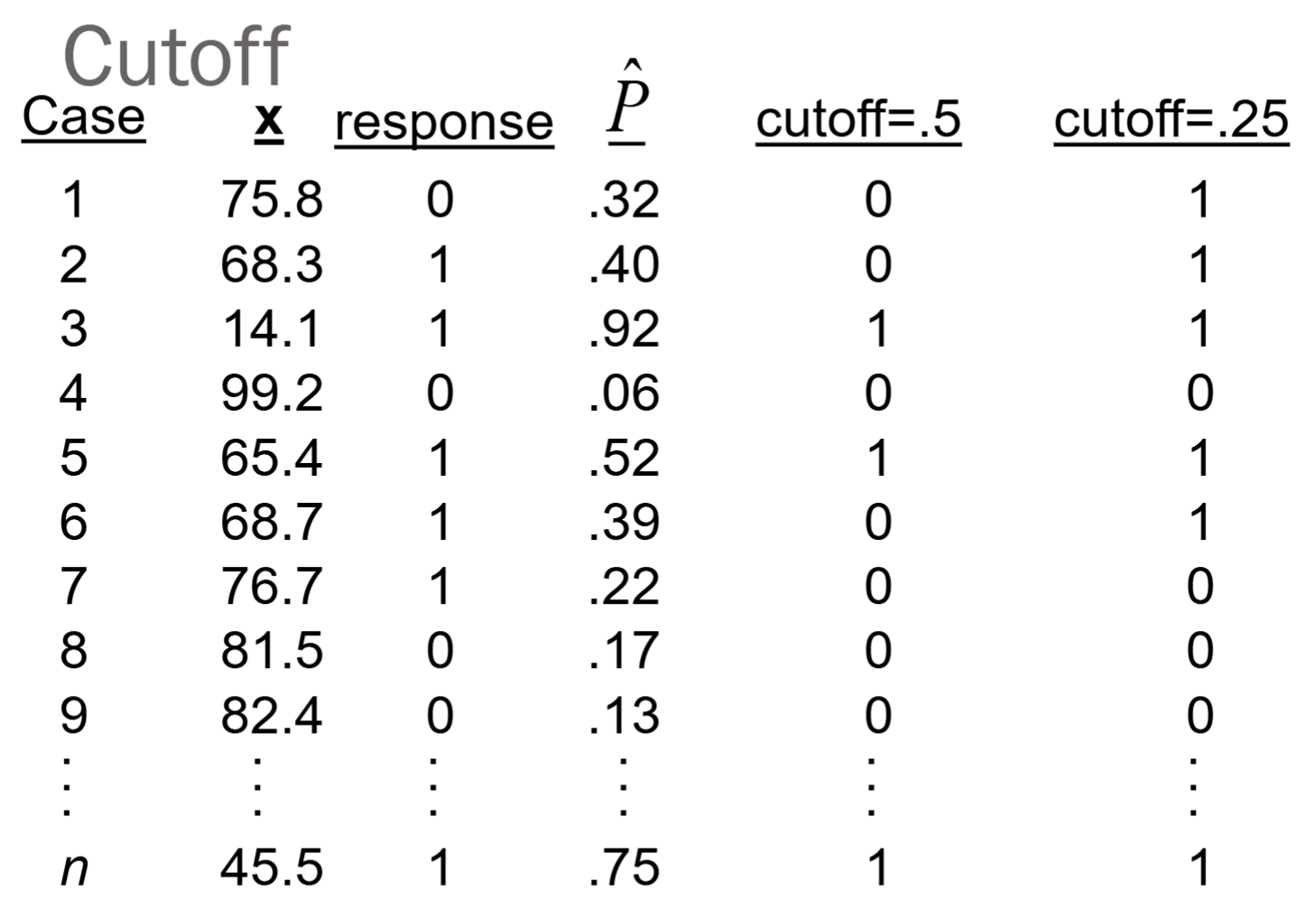
In this section, we focus on logistic regression with a binary response variable, 0 or 1. To predict the response variable using logistic regression, we need a threshold/cutoff value between 0 and 1. This is because the logistic regression provide only the probability of success at a given x.

Therefore, we can predict the response to be 0 if prob < cutoff, and predict it to be 1 if prob >= cutoff. The default cutoff is 0.5.

With the predicted response, we can compare it with the actual response using the confusion matrix below.

Confusion matrix
True label Predicted as 0 Predicted as 1
Actual 0, negative A, true negative B, false positive
Actual 1, positive C, false negative D, true positive

The misclassification error rate = (B + C)/(A + B + C + D)

True positive fraction (TPF or sensitivity) is the proportion of positives correctly predicted as positive: D/(C+D).

False positive fraction (FPF or 1-specificity), is the proportion of negatives incorrectly predicted as positive: B/(A+B).

Note that the misclassification error rate, TPF, and FPF are all functions of the cutoff value. If we change the cutoff value, the they also changes.

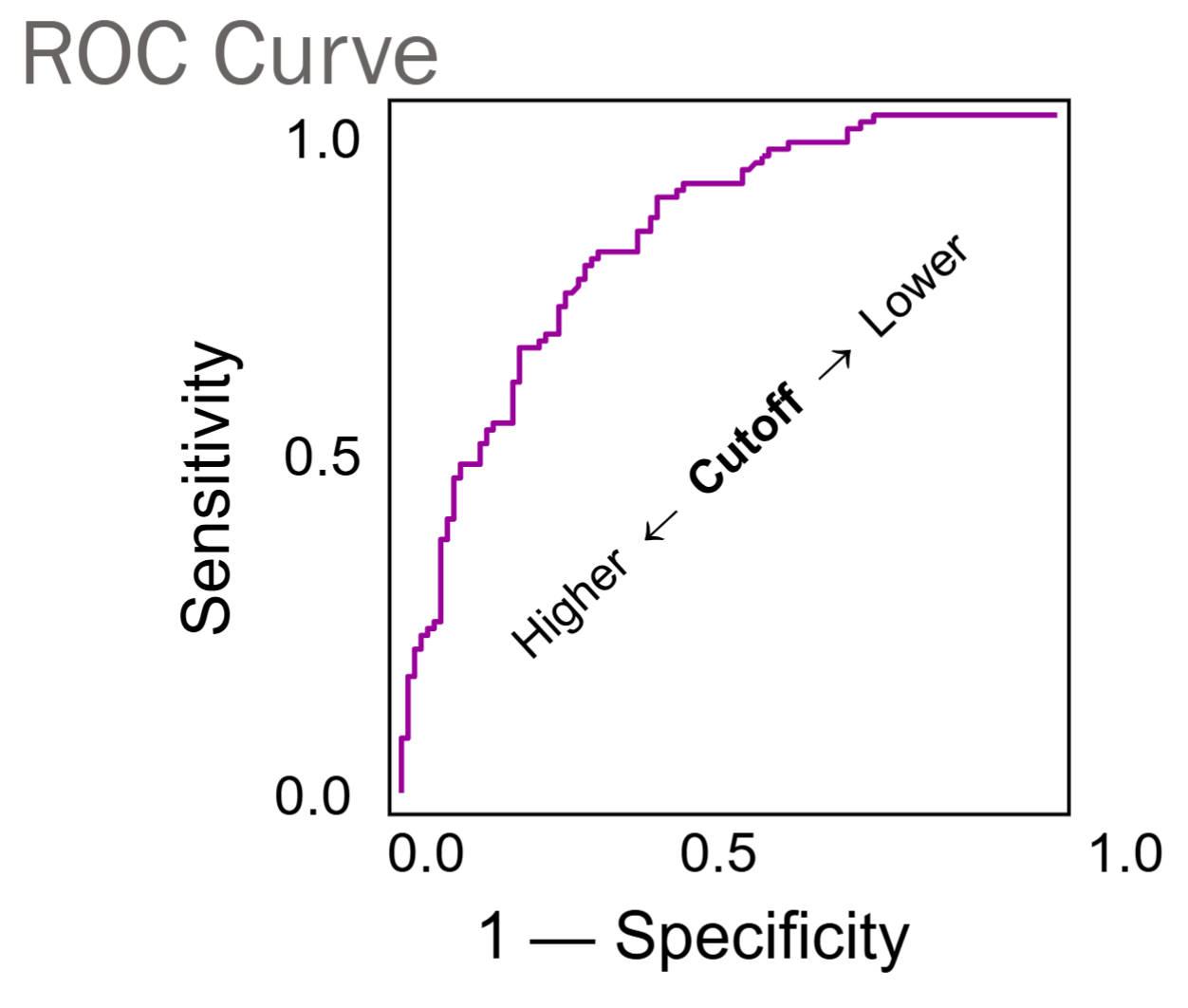
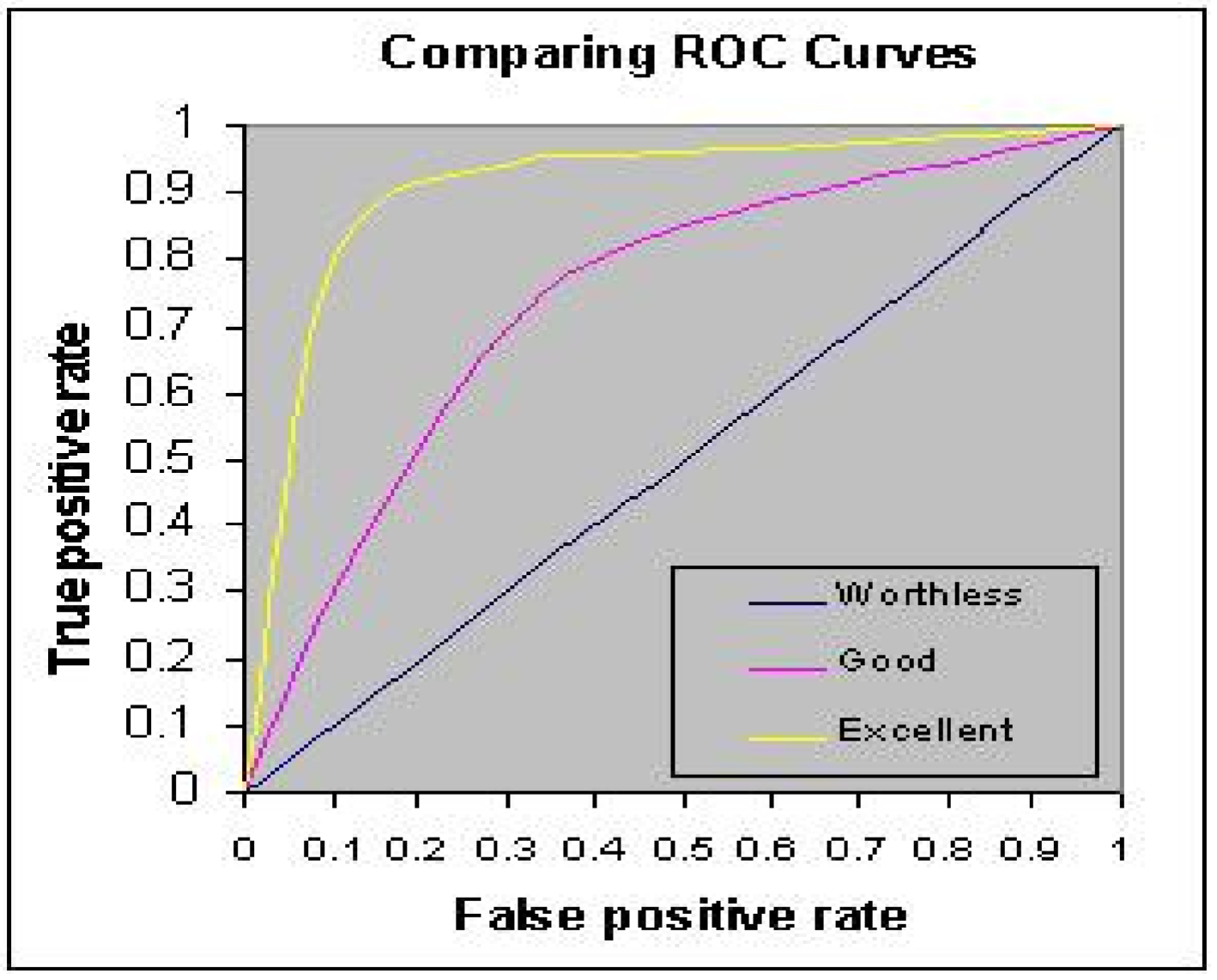
A way to expand on this idea is to get an overall measure of goodness of classification using the receiver operating characteristic (ROC) curve. ROC curve is generated by plotting FPF (1-specificity) against TPF (sensitivity) at different levels of cutoff values.

Here is an example of changing the cutoff value from 0.5 to 0.25.

If we let the cutoff value change from 0 to 1, or 1 to 0, we have the following ROC curve.

Both TPF and FPF vary inversely with the cutoff value.

The higher the cutoff, the harder it is to classify an observation as positive or 1. As the cutoff increases, both the B and D decrease.

The ROC curve shows possible TPF/FPF combinations as the cutoff value varies.

To evaluate the ROC curve, we usually use the area under the curve (AUC). A rule of thumb (industry standard) is that AUC > 0.7 represents acceptable discriminatory power.

Sometimes, we may face a slightly different binary classification problem.

For example, in bankruptcy prediction, fail to predict a bankruptcy is much more serious than predict a false bankruptcy.

Therefore, we introduce the asymmetric misclassification error rate (AMR) with a revised cutoff value pcut = 1/(1 + r)

AMR = (B + C*r)/(A + B + C + D)

Confusion matrix
True label Predicted as 0 Predicted as 1
Actual 0, negative A B
Actual 1, positive C, this is the case of Lehman Brothers D, true positive

3.2. Training Set and Test Set Split

We use the credit data to illustrate the evaluation of logistic regression. We first split the data into training and test sets, and train the model on the training set.

library(tidyverse)
── Attaching core tidyverse packages ──────────────────────── tidyverse 2.0.0 ──
✔ dplyr     1.1.4     ✔ readr     2.1.6
✔ forcats   1.0.1     ✔ stringr   1.5.2
✔ ggplot2   4.0.1     ✔ tibble    3.3.1
✔ lubridate 1.9.4     ✔ tidyr     1.3.2
✔ purrr     1.2.1     
── Conflicts ────────────────────────────────────────── tidyverse_conflicts() ──
✖ tidyr::expand() masks Matrix::expand()
✖ dplyr::filter() masks stats::filter()
✖ dplyr::lag()    masks stats::lag()
✖ tidyr::pack()   masks Matrix::pack()
✖ dplyr::select() masks MASS::select()
✖ tidyr::unpack() masks Matrix::unpack()
ℹ Use the conflicted package (<http://conflicted.r-lib.org/>) to force all conflicts to become errors
credit = read_csv("data/credit_default.csv")
Rows: 30000 Columns: 24
── Column specification ────────────────────────────────────────────────────────
Delimiter: ","
dbl (24): LIMIT_BAL, SEX, EDUCATION, MARRIAGE, AGE, PAY_0, PAY_2, PAY_3, PAY...

ℹ Use `spec()` to retrieve the full column specification for this data.
ℹ Specify the column types or set `show_col_types = FALSE` to quiet this message.
credit$SEX = as.factor(credit$SEX)
credit$EDUCATION = as.factor(credit$EDUCATION)
credit$MARRIAGE = as.factor(credit$MARRIAGE)
index <- sample(nrow(credit),nrow(credit)*0.80)
credit_train = credit[index,]
credit_test = credit[-index,]
credit_glm_train = glm(default ~ ., 
                       family=binomial, 
                       data=credit_train)
Warning: glm.fit: fitted probabilities numerically 0 or 1 occurred
summary(credit_glm_train)

Call:
glm(formula = default ~ ., family = binomial, data = credit_train)

Coefficients:
              Estimate Std. Error z value Pr(>|z|)    
(Intercept) -9.796e-01  9.662e-02 -10.138  < 2e-16 ***
LIMIT_BAL   -8.918e-07  1.785e-07  -4.995 5.88e-07 ***
SEX2        -1.356e-01  3.438e-02  -3.944 8.02e-05 ***
EDUCATION2  -9.140e-02  3.982e-02  -2.295 0.021707 *  
EDUCATION3  -1.071e-01  5.318e-02  -2.013 0.044098 *  
EDUCATION4  -1.197e+00  2.147e-01  -5.575 2.47e-08 ***
MARRIAGE2   -1.978e-01  3.874e-02  -5.106 3.30e-07 ***
MARRIAGE3   -1.854e-01  1.458e-01  -1.272 0.203510    
AGE          6.049e-03  2.071e-03   2.921 0.003490 ** 
PAY_0        5.927e-01  1.986e-02  29.849  < 2e-16 ***
PAY_2        8.777e-02  2.267e-02   3.873 0.000108 ***
PAY_3        5.092e-02  2.523e-02   2.018 0.043609 *  
PAY_4        5.100e-02  2.780e-02   1.834 0.066607 .  
PAY_5        3.597e-02  3.000e-02   1.199 0.230554    
PAY_6       -1.252e-02  2.479e-02  -0.505 0.613443    
BILL_AMT1   -4.563e-06  1.205e-06  -3.785 0.000154 ***
BILL_AMT2    1.372e-06  1.641e-06   0.836 0.402956    
BILL_AMT3    1.129e-06  1.506e-06   0.749 0.453558    
BILL_AMT4   -1.808e-07  1.538e-06  -0.118 0.906417    
BILL_AMT5    1.148e-06  1.702e-06   0.674 0.500139    
BILL_AMT6    4.926e-07  1.341e-06   0.367 0.713432    
PAY_AMT1    -1.091e-05  2.456e-06  -4.444 8.81e-06 ***
PAY_AMT2    -1.262e-05  2.553e-06  -4.944 7.64e-07 ***
PAY_AMT3    -1.506e-06  1.799e-06  -0.837 0.402347    
PAY_AMT4    -4.314e-06  1.966e-06  -2.194 0.028235 *  
PAY_AMT5    -3.764e-06  2.105e-06  -1.788 0.073722 .  
PAY_AMT6    -7.825e-07  1.379e-06  -0.567 0.570443    
---
Signif. codes:  0 '***' 0.001 '**' 0.01 '*' 0.05 '.' 0.1 ' ' 1

(Dispersion parameter for binomial family taken to be 1)

    Null deviance: 25438  on 23999  degrees of freedom
Residual deviance: 22195  on 23973  degrees of freedom
AIC: 22249

Number of Fisher Scoring iterations: 6

We evaluate the model on the training set. This is only for practice. This is not the correct way to evaluate the model.

prob_train = predict(credit_glm_train, type="response")
table(credit_train$default, 
      (prob_train > 0.9)*1, 
      dnn = c("Truth","Predicted"))
     Predicted
Truth     0     1
    0 18639    23
    1  5305    33
table(credit_train$default, 
      (prob_train > 0.5)*1, 
      dnn = c("Truth","Predicted"))
     Predicted
Truth     0     1
    0 18098   564
    1  3959  1379
table(credit_train$default, 
      (prob_train > 0.2)*1, 
      dnn = c("Truth","Predicted"))
     Predicted
Truth     0     1
    0 11075  7587
    1  1548  3790
table(credit_train$default, 
      (prob_train > 0.0001)*1, 
      dnn = c("Truth","Predicted"))
     Predicted
Truth     0     1
    0     4 18658
    1     0  5338
cost1 <- function(r, pi, pcut = 1/2){
  mean(((r==0)&(pi>pcut)) | ((r==1)&(pi<pcut)))
}
cost2 <- function(r, pi, pcut=1/6){
  weight1 <- 5
  weight0 <- 1
  c1 <- (r==1)&(pi<pcut) 
  #logical vector - true if actual 1 but predict 0
  c0 <-(r==0)&(pi>pcut) 
  #logical vector - true if actual 0 but predict 1
  return(mean(weight1*c1+weight0*c0))
}
cost1(r = credit_train$default, pi = prob_train, pcut=1/2)
[1] 0.1884583
cost2(r = credit_train$default, pi = prob_train, pcut=1/6)
[1] 0.6735

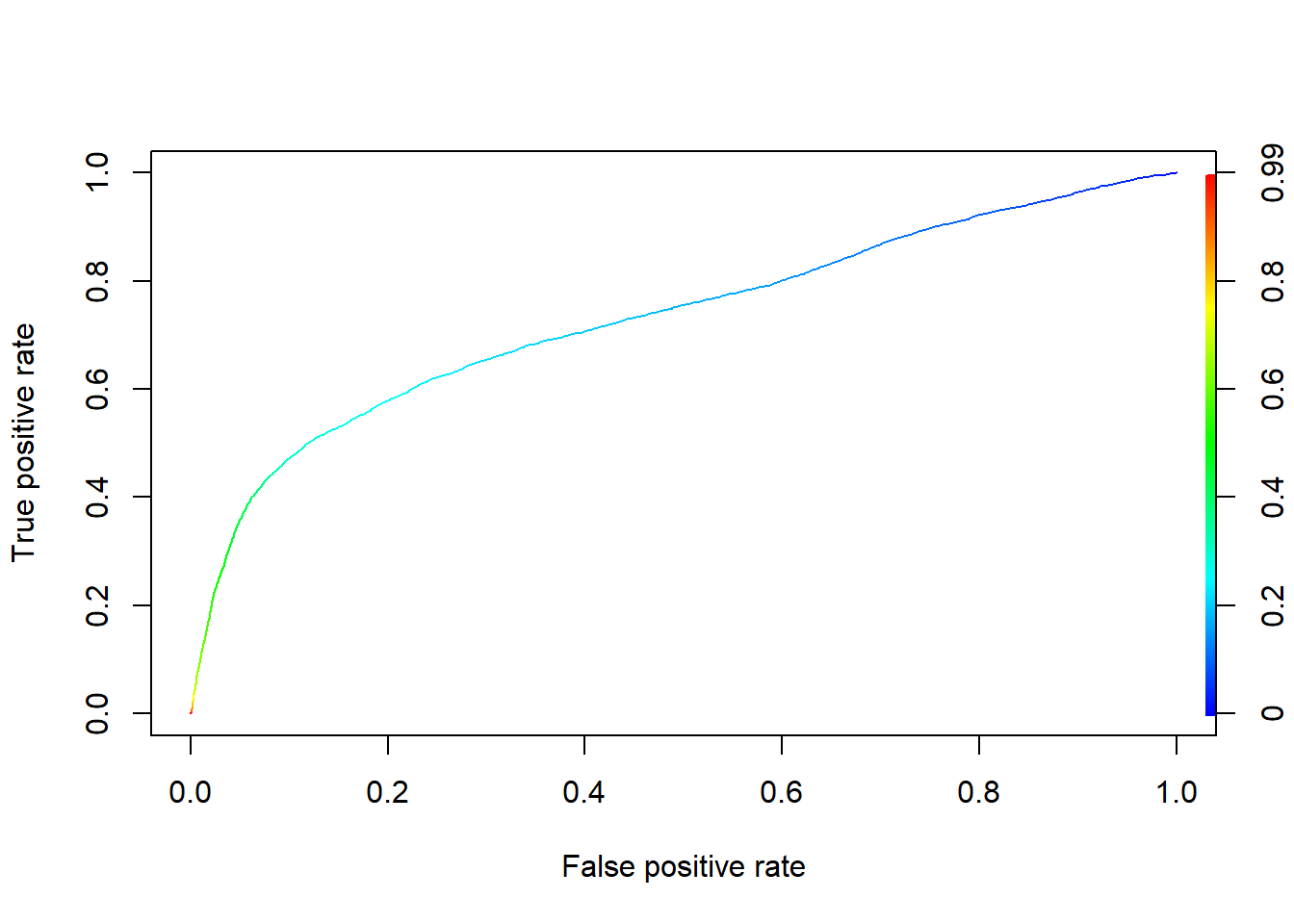
We construct the ROC curve on the training set.

prob_train = predict(credit_glm_train, 
                     type = "response")
#install.packages('ROCR')
library(ROCR)
pred <- prediction(prob_train,
                   credit_train$default)
perf <- performance(pred, "tpr", "fpr")
plot(perf, colorize=TRUE)

unlist(slot(performance(pred, "auc"), "y.values"))
[1] 0.7311572

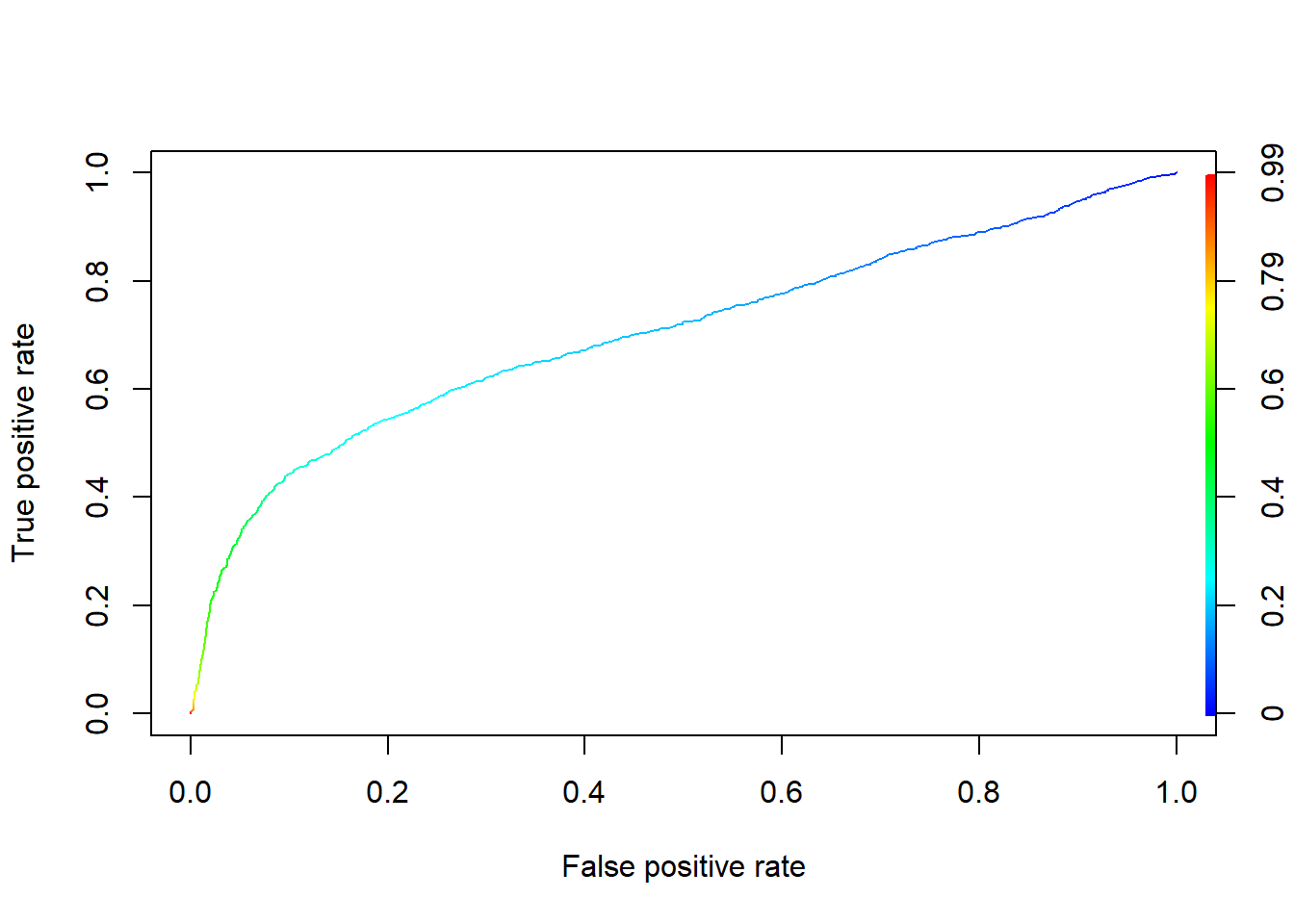
Finally, we evaluate it on the test set using ROC and AUC.

prob_test<- predict(credit_glm_train, 
                    newdata = credit_test, 
                    type="response")
library(ROCR)
pred <- prediction(prob_test, credit_test$default)
perf <- performance(pred, "tpr", "fpr")
plot(perf, colorize=TRUE)

unlist(slot(performance(pred, "auc"), "y.values"))
[1] 0.7040469

3.3. Cross Validation

To evaluate the generalized linear model using cross validation, we use the R function cv.glm(). This function conducts the K-fold cross-validation for the generalized linear models and obtain its prediction error.

The syntax is cv.glm(data, glmfit, cost, K)

data: the full data

glmfit: the generalized linear model we build

cost: it is by default tne mean squared error (MSE) for regression. We need to adjust it for classification, e.g. ((asymmetric) misclassification rate, AUC)

K: the number of folds in cross validation. It is by default n, i.e., the sample size. Typically we use K=2, … ,10.

pcut <- 0.5

#Symmetric cost, equivalently pcut=1/2
sym_cost <- function(r, pi, pcut=1/2){
  mean(((r==0)&(pi>pcut)) | ((r==1)&(pi<pcut)))
}

#Asymmetric cost, pcut=1/(5+1) for 5:1 ratio
asym_cost  <- function(obs, pred.p){
  # define the weight for "true=1 but pred=0" (FN)
  weight1 <- 5   
  # define the weight for "true=0 but pred=1" (FP)
  weight0 <- 1    
  pcut <- 1/(1+weight1/weight0)
  # logical vector for "true=1 but pred=0" (FN)
  c1 <- (obs==1)&(pred.p < pcut)    
  #logical vector for "true=0 but pred=1" (FP)
  c0 <- (obs==0)&(pred.p >= pcut)   
  # misclassification with weight
  cost <- mean(weight1*c1 + weight0*c0)  
  # you have to return to a value when you write R functions
  return(cost) 
} # end 

#AUC as cost
AUC_cost = function(obs, pred.p){
  pred <- prediction(pred.p, obs)
  perf <- performance(pred, "tpr", "fpr")
  cost =unlist(slot(performance(pred, "auc"), 
                    "y.values"))
  return(cost)
} 

library(boot)
credit_glm <- glm(default~. , 
                  family = binomial, 
                  data = credit);  
Warning: glm.fit: fitted probabilities numerically 0 or 1 occurred
# symmetric misclassification error rate as cost 
cv_result  <- cv.glm(data = credit, 
                     glmfit = credit_glm, 
                     cost = sym_cost, 
                     K=10) 
Warning: glm.fit: fitted probabilities numerically 0 or 1 occurred
cv_result$delta[2] 
[1] 0.1895567
# asymmetric misclassification error rate 5:1 as cost 
cv_result  <- cv.glm(data = credit, 
                     glmfit = credit_glm, 
                     cost = asym_cost, 
                     K=10) 
Warning: glm.fit: fitted probabilities numerically 0 or 1 occurred
cv_result$delta[2] 
[1] 0.6850033
# AUC as the cost
library(ROCR)
cv_result1  <- cv.glm(data = credit, 
                      glmfit = credit_glm, 
                      cost = AUC_cost, 
                      K=10) 
Warning: glm.fit: fitted probabilities numerically 0 or 1 occurred
cv_result1$delta[2] #AUC as cost
[1] 0.7245507